Custom REST Connector Config: Settings
The Settings object contains configuration parameters such as the name of the REST provider, the name of the connector to be displayed in the ElastiCube Manager, the maximum number of data records to be scanned when determining a document's schema, and additional Configuration parameters.
Properties
| Name | Type | Required | Description |
|---|---|---|---|
Provider | string | Yes | Provider system name. See Provider Details |
ConnectorAssemblyFileName | string | Yes | The value of this key should be set to _rest.tag when you want Sisense to automatically copy the REST Connector DLL file to your connector’s folder. The advantage of this method is you do not need to add the Sisense REST Connector DLL file each time you upgrade Sisense. When defining this key’s value, the FileList key must contain the name of your connector’s configuration files. |
FileList | string[] | Yes | The list of configuration files associated with your custom connector. Typically, the values of this key are config.json, and oath.json. This key is only mandatory when ConnectorAssemblyFileName is set to _reg.tag. |
DisplayName | string | No | Name of the connector to be displayed in the ElastiCube Manager. If no value is set, the value of Provider is displayed. |
SchemaMapFile | string | No | The name of the file with the schema. This file must be located in the same directory as your other Custom REST files. |
SchemaMapCatalog | string | No | The name of the schema catalog. |
StringColumnLength | integer | No | The string column length for a table. |
MaxDocs | integer | Yes | Maximum number of records fetched from a resource. This is used to determine a data schema. |
FetchSize | integer | Yes | Number of records fetched before caching data. For example, if FetchSize = 1000 and PageSize = 400, three calls will be executed before buffering. On the third call it will be calculated that current number of fetched records is more than 1000 and the next execution will be stopped for buffering. |
OAuth2Config | string | No | File name of the OAuth2 configuration file |
IsAccumulativeSupported | boolean | No | When True, accumulative builds are supported for the relevant tables within the ElastiCube Manager. By default, this value is false. To define which tables support accumulative builds, see AccumulativeSettings. |
Parameters | object[] | No | A hashtable of string type key-value pairs that can be used as parameters in other configuration sections. For more information, see Parameters. |
RetryPolicyConfigs | object[] | No | Retry policy. See RetryPolicyConfigs Details |
UIParameters | object | No | Optional UI parameters. See UIParams Details |
Provider Details
Provider system name. This name is used by Sisense to identify your connector and should start with the prefix rest- . For example, rest-marketo, rest-facebook, etc.
If you have multiple connectors using the same data source each with their own settings, the Provider system name should be unique, for example, rest-facebook1 and rest-facebook2
This string has the following limitations:
- The null character (
\u0000) cannot be part of a path name. - The following character ranges are not rendered well:
\u0001-\u0019and\u007F - \u009F. - The following character ranges are not allowed:
\ud800-\uF8FFF,\uFFF0-\uFFFF,\uXFFFE-\uXFFFF(where X is a digit 1 - E),\uF0000-\uFFFFF.
RetryPolicyConfigs Details
The retry policy array defines how and when Sisense should retry to query a custom REST data source when an error occurs.
In the Actions (Tables) object, you define which errors trigger the relevant retry policy.
The RetryPolicyConfigs array members have the following properties:
| Name | Type | Required | Description |
|---|---|---|---|
Name | string | Yes | A unique name for the retry policy that you define. This name is used in the Actions (Tables) object in the CodeValues array to define a retry policy for an error. |
NumberOfRetries | integer | Yes | How many attempts should be executed before cancelling a request. |
Delay | integer | Yes | Initial sleeping period in seconds between attempts. |
Factor | integer | Yes | A multiplier for a next sleeping period. For example, if the value is 2 and the value of Delay is 10, on the second attempt, Sisense waits 2(Factor) * 10(Delay) seconds before attempting another request. On the third attempt, Sisense waits 2* 2*10 seconds, etc. |
ContinueOnError | boolean | Yes | Defines Sisense’s behavior following an error; true: (Default) Continue execution; false: Throw an exception and stop execution. |
UIParameters Details
The UIParameters object is an optional object that you can add to the Settings object inside your configuration file. This object displays a UI in the ElastiCube Manager for passing information for Oauth2 authentication.
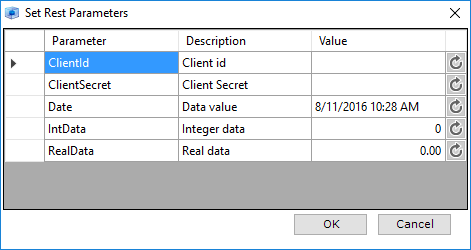
During OAuth2 authentication, the resource provider requires certain details such as the ClientId and ClientSecret to authenticate the user and provide the connector with access to the requested resources. The ClientId is a string used by the resource provider’s API to identify the application, and is also used to build authorization URLs that are presented to users. The ClientSecret is used to authenticate the identity of the application to the resource provider’s API. The UIParameters object enables your users to dynamically define their ClientID and ClientSecret keys without having to expose these values in the configuration file.
Note
When using UIParameters, comment out the values in the oauth2Config.json file to prevent Sisense from reading those instead.
For more information about OAuth2, click here.
In addition to ClientId and ClientSecret, Sisense has four other optional parameter types you can use to pass information to the resource provider. Each type of parameter provides some validation for the value the user can enter. For example, datetime parameters can accept only values in a date and time format, and integers can only accept numeric values.
You can redefine any of the fields to pass only the relevant information to the resource provider. The format of your code in the JSON file should be as follows:
{
   "parameter-name" :  "description;type"
}
These are the types you can use for UIParams:
| Name | Description | Example |
|---|---|---|
datetime | Accepts a DateTime value in the format of yyyy-MM-dd. The user can also click the Value field to open a datepicker that enters the selected date in the correct format. | { "Date": "Date value; datetime; yyyy-MM-dd" } |
bool | Displays a checkbox to accept a boolean value where a checked box indicates True and a clear checkbox indicates False. | { "New User?": "Boolean data;bool" } |
int | Accepts integer values. | { "User ID": "Enter User ID; int" } |
real | Real numbers in which a decimal point is included. For example, 1.00 | { "Version": "Enter API Version; real" } |
For example, if you want to display a Date field that allows the user to open a datepicker, the code should be defined as follows:
"Date": "Select a date: datetime",
{
   "Date" :  "Select a date;datetime"
}
The follow code sample is an example of a UI window that includes the ClientID and Client Secret as well as the four additional parameters.
"UIParameters": {
   "ClientId": "Client id;string",
   "ClientSecret": "Client Secret;string",
   "Date": "Current Date;datetime",
   "New User?": "Boolean data;bool",
   "User ID": "Enter User ID;int",
   "Version": "Enter API Version;real"
}
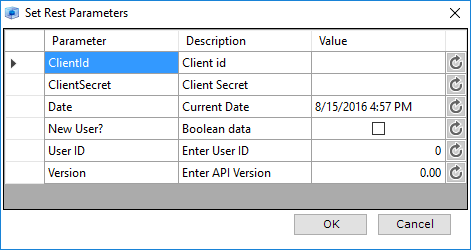
When defining the UIParameters object, the parameters are case insensitive, however, the parameters need to match the names of parameters expected by your resource provider’s API.
Within the Value fields, you can also pass Configuration parameters such as InMemory parameters as described here. For example, if you wish to define an access key that has been saved in memory, your user can enter [@accesstoken] as the value of the field.
Example
{
    "Settings": {
        "Provider": "rest-marketo",
        "ConnectorAssemblyFileName": "_rest.tag",
        "FileList":  [
           "config.json",
           "oauth2Config.json"
        ],
        "DisplayName": "Marketo",
        "SchemaMapFile": "schema.json",
        "SchemaMapCatalog": "zendeskSchema",
        "StringColumnLength": 1000,
        "MaxDocs": 100,
        "FetchSize": 1000,
        "OAuth2Config": "oauth2Config.json",
        "IsAccumulativeSupported": true,
        "Parameters": {
            "uri": "https://123-OXE-123.mktorest.com",
            "startDate": "2016-01-1"
        },
        "UIParameters": {
            "ClientId": "Client id;string",
            "ClientSecret": "Client Secret;string",
            "Date": "Current Date;datetime",
            "New User?": "Boolean data;bool",
            "User ID": "Enter User ID;int",
            "Version": "Enter API Version;real"
         },
        "RetryPolicyConfigs":[
         {
            "Name":"default",
            "NumberOfRetries":5,
            "Delay":70,
            "Factor":1,
            "ContinueOnError":true
         },
         {
            "Name":"quick",
            "NumberOfRetries":3,
            "Delay":10,
            "Factor":1,
            "ContinueOnError":true
         },
         {
            "Name":"average",
            "NumberOfRetries":10,
            "Delay":65,
            "Factor":1,
            "ContinueOnError":true
         }
      ]
    }
}