Function useExecuteQuery
useExecuteQuery(...
args):ExecuteQueryResult
React hook that executes a data query.
This approach, which offers an alternative to the ExecuteQuery component, is similar to React Query's useQuery hook.
Parameters
| Parameter | Type |
|---|---|
...args | [ExecuteQueryParams] |
Returns
Query state that contains the status of the query execution, the result data, or the error if any occurred
Example
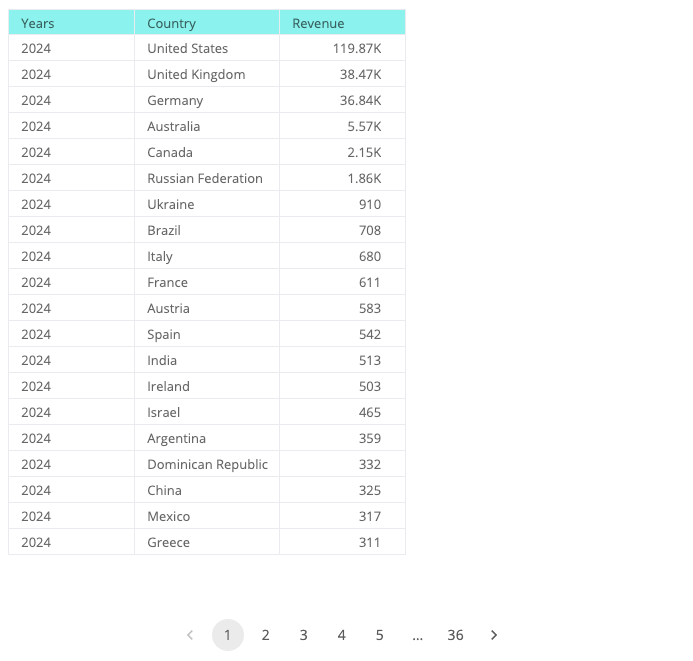
Execute a query to retrieve revenue per country per year from the Sample ECommerce data model, sorted by revenue and year, and display the data in a table.
import { Table, useExecuteQuery } from '@sisense/sdk-ui';
import { measureFactory, Sort } from '@sisense/sdk-data';
import * as DM from './sample-ecommerce';

const CodeExample = () => {
  const { data } = useExecuteQuery({
    dataSource: DM.DataSource,
    dimensions: [DM.Commerce.Date.Years.sort(Sort.Descending), DM.Country.Country],
    measures: [measureFactory.count(DM.Commerce.Revenue, 'Revenue').sort(Sort.Descending)],
  });

  return (
    <>
      {data && (
        <Table
          dataSet={data}
          dataOptions={{ columns: data.columns }}
          styleOptions={{ rowsPerPage: 20, height: 650 }}
        />
      )}
    </>
  );
};

export default CodeExample;
See also: Take Control of Your Data Visualizations, a blog post with examples of using the hook to fetch data to display in third-party charts.