Class ChartWidgetComponent
The Chart Widget component extending ChartComponent to support widget style options.
Example
import { Component } from '@angular/core';
import { measureFactory } from '@sisense/sdk-data';
import * as DM from './sample-ecommerce';

@Component({
  selector: 'code-example',
  template: `
    `<csdk-chart-widget
      [title]="title"
      [description]="description"
      [chartType]="chartType"
      [dataSource]="DM.DataSource"
      [dataOptions]="dataOptions"
    >` `</csdk-chart-widget>`
  `,
})
export class CodeExample {
  DM = DM;
  // Change this to "line" to see a line chart
  chartType = 'column';
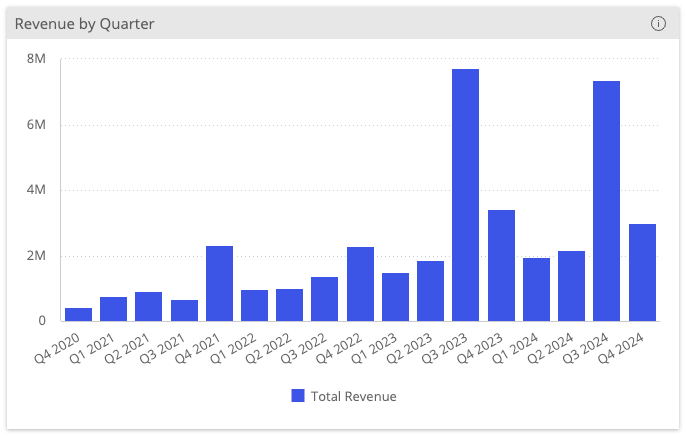
  title = 'Revenue by Quarter';
  description = 'This chart shows the total revenue by quarter.';
  dataOptions = {
    category: [DM.Commerce.Date.Quarters],
    value: [measureFactory.sum(DM.Commerce.Revenue, 'Total Revenue')],
    breakBy: [],
  };
}
Implements
AfterViewInitOnChangesOnDestroy
Constructors
constructor
new ChartWidgetComponent(
sisenseContextService,themeService):ChartWidgetComponent
Parameters
| Parameter | Type |
|---|---|
sisenseContextService | SisenseContextService |
themeService | ThemeService |
Returns
Properties
Data
dataSource
dataSource:
DataSource|undefined
Data source the query is run against - e.g. Sample ECommerce
If not specified, the query will use the defaultDataSource specified in the parent Sisense Context.
filters
filters:
FilterRelations|Filter[] |undefined
Filters that will slice query results
highlights
highlights:
Filter[] |undefined
Highlight filters that will highlight results that pass filter criteria
Chart
chartType
chartType:
ChartType
Default chart type of each series
dataOptions
dataOptions:
ChartDataOptions
Configurations for how to interpret and present the data passed to the chart
Widget
config
config:
ChartWidgetConfig|undefined
Configuration of the widget
description
description:
string|undefined
Description of the widget
highlightSelectionDisabled
highlightSelectionDisabled:
boolean|undefined
Boolean flag whether selecting data points triggers highlight filter of the selected data
Recommended to turn on when the Chart Widget component is enhanced with data drilldown by the Drilldown Widget component
If not specified, the default value is false
id
id:
string|undefined
Widget identifier
Used to identify the widget when exporting its data (for example, the "Download as Excel" action).
styleOptions
styleOptions:
ChartWidgetStyleOptions|undefined
Style options for both the chart and widget including the widget header
title
title:
string|undefined
Title of the widget
Callbacks
beforeRender
beforeRender:
BeforeRenderHandler|IndicatorBeforeRenderHandler|KpiBeforeRenderHandler|undefined
A callback that allows you to customize the underlying chart element before it is rendered. The returned options are then used when rendering the chart.
This callback is not supported for Areamap Chart, Scattermap Chart, Table, and PivotTable.
dataPointClick
dataPointClick:
EventEmitter<ChartDataPointClickEvent>
Click handler callback for a data point
dataPointContextMenu
dataPointContextMenu:
EventEmitter<ChartDataPointContextMenuEvent>
Context menu handler callback for a data point
dataPointsSelect
dataPointsSelect:
EventEmitter<ChartDataPointsEvent>
Handler callback for selection of multiple data points
dataReady
dataReady: (
data) =>Data|undefined
A callback that allows to modify data immediately after it has been retrieved. It can be used to inject modification of queried data.