Class WidgetComponent
Facade component that renders a widget within a dashboard based on the widget type.
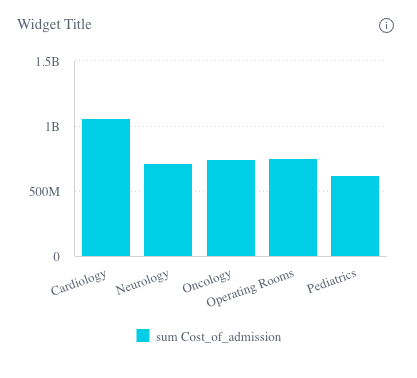
Example
<!--Component HTML template in example.component.html-->
<csdk-widget
 [id]="widgetProps.id"
 [title]="widgetProps.title"
 [widgetType]="widgetProps.widgetType"
 [chartType]="widgetProps.chartType"
 [dataSource]="widgetProps.dataSource"
 [dataOptions]="widgetProps.dataOptions"
/>
// Component behavior in example.component.ts
import { Component } from '@angular/core';
import { type WidgetProps } from '@sisense/sdk-ui-angular';

@Component({
 selector: 'example',
 templateUrl: './example.component.html',
 styleUrls: ['./example.component.scss'],
})
export class ExampleComponent {
 widgetProps: WidgetProps = {
   id: 'widget-id',
   widgetType: 'chart',
   chartType: 'column',
   title: 'Widget Title',
   dataSource: DM.DataSource,
   dataOptions: {
     category: [DM.Divisions.Divison_name],
     value: [measureFactory.sum(DM.Admissions.Cost_of_admission)],
     breakBy: [],
   },
 };
}
Implements
AfterViewInitOnChangesOnDestroy
Constructors
constructor
new WidgetComponent(
sisenseContextService,themeService):WidgetComponent
Parameters
| Parameter | Type |
|---|---|
sisenseContextService | SisenseContextService |
themeService | ThemeService |
Returns
Properties
Data
dataSource
dataSource:
DataSource|undefined
Data source the query is run against - e.g. Sample ECommerce
If not specified, the query will use the defaultDataSource specified in the parent Sisense Context.
filters
filters:
FilterRelations|Filter[] |undefined
Filters that will slice query results
highlights
highlights:
Filter[] |undefined
Highlight filters that will highlight results that pass filter criteria
Chart
chartType
chartType:
ChartType|undefined
Default chart type of each series
dataOptions
dataOptions:
ChartDataOptions|GenericDataOptions|PivotTableDataOptions|undefined
Configurations for how to interpret and present the data passed to the chart
Widget
config
config:
ChartWidgetConfig|CustomWidgetConfig|FilterWidgetConfig|NarrativeWidgetConfig|PivotTableWidgetConfig|TextWidgetConfig|undefined
Configuration of the widget
customWidgetType
customWidgetType:
string|undefined
Custom widget type. This is typically the name/ID of the custom widget.
description
description:
string|undefined
Description of the widget
drilldownOptions
drilldownOptions:
DrilldownOptions|PivotTableDrilldownOptions|undefined
List of categories to allow drilldowns on
id
id:
string
Unique identifier of the widget
styleOptions
styleOptions:
ChartWidgetStyleOptions|CustomWidgetStyleOptions|FilterWidgetStyleOptions|NarrativeWidgetStyleOptions|PivotTableWidgetStyleOptions|TextWidgetStyleOptions|undefined
Style options for both the chart and widget including the widget header
title
title:
string|undefined
Title of the widget
widgetType
widgetType:
"chart"|"custom"|"filter"|"narrative"|"pivot"|"text"
Widget type
Callbacks
beforeRender
beforeRender:
BeforeRenderHandler|IndicatorBeforeRenderHandler|KpiBeforeRenderHandler|undefined
A callback that allows you to customize the underlying chart element before it is rendered. The returned options are then used when rendering the chart.
This callback is not supported for Areamap Chart, Scattermap Chart, Table, and PivotTable.
dataPointClick
dataPointClick:
EventEmitter<WidgetDataPointClickEvent>
Click handler callback for a data point
dataPointContextMenu
dataPointContextMenu:
EventEmitter<WidgetDataPointContextMenuEvent>
Context menu handler callback for a data point
dataPointsSelect
dataPointsSelect:
EventEmitter<ChartDataPointsEvent>
Handler callback for selection of multiple data points
dataReady
dataReady: (
data) =>Data|undefined
A callback that allows to modify data immediately after it has been retrieved. It can be used to inject modification of queried data.